
Download Football Forecaster – Free, Secure Mac Sports Forecasting Tool
Overview of Football Forecaster
Football Forecaster is a full‑version sports‑analysis program built specifically for macOS. Developed by Harris Bornstein, this English‑language app delivers a comprehensive suite of statistical tools, predictive algorithms, and visual dashboards designed to help both casual fans and serious bettors anticipate match outcomes with greater confidence. Unlike many generic sports apps, Football Forecaster focuses exclusively on football (soccer), aggregating data from major leagues, international tournaments, and even lower‑division competitions.
The software pulls live odds, player performance metrics, injury reports, and weather conditions to generate a weighted probability score for each fixture. Its intuitive interface lets users filter by league, team, or date, while built‑in charting utilities turn raw numbers into easy‑to‑read heat maps and trend lines. Whether you’re planning a weekend betting strategy, preparing a fantasy‑football lineup, or simply love digging into the numbers behind the beautiful game, Football Forecaster offers a secure, regularly updated environment that runs natively on Mac hardware.
The program is distributed as a single downloadable package, eliminating the need for additional plug‑ins or third‑party services, and it respects macOS security standards by signing the installer with a valid developer certificate. This ensures a smooth, hassle‑free installation experience while protecting your system from unwanted code. Overall, Football Forecaster stands out as a dedicated, data‑driven solution that transforms raw match data into actionable insights for anyone passionate about football.
Powerful Features of Football Forecaster
- Live Data Integration: Automatic import of real‑time match statistics, odds, and injury updates from reputable sports data providers.
- Predictive Engine: Advanced machine‑learning algorithms calculate win/draw/loss probabilities for each game.
- Customizable Filters: Users can narrow forecasts by league, country, date range, or specific teams.
- Interactive Dashboards: Visual heat maps, trend graphs, and comparative charts make complex data easy to digest.
- Betting‑Tool Suite: Includes stake calculators, expected value (EV) estimators, and risk‑management recommendations.
- Fantasy‑Football Helper: Generates optimal player picks based on form, fixtures, and opponent strength.
- Historical Archive: Access to over five years of past match data for back‑testing strategies.
- Secure Cloud Sync: Optional iCloud backup keeps your settings and custom analyses synchronized across multiple Macs.
- Regular Updates: Monthly software patches introduce new leagues, improve algorithms, and fix bugs.
- Multi‑Language Support: While the default language is English, the UI can be switched to several major languages via the preferences pane.
Installation, Usage & Compatibility
System Requirements
Football Forecaster requires macOS 11.0 (Big Sur) or later and at least 4 GB of RAM. A minimum of 250 MB of free disk space is needed for the core application; additional space is recommended for historical data storage.
Step‑by‑Step Installation
- Visit the official Football Forecaster download page and click the Download for macOS button. The installer file (
.dmg) will be saved to yourDownloadsfolder. - Double‑click the
.dmgfile to mount the disk image. macOS will verify the developer signature; if a warning appears, select “Open” to proceed. - Drag the Football Forecaster icon into the
Applicationsfolder shortcut that appears in the installer window. - Eject the disk image by right‑clicking its icon on the desktop and choosing “Eject”.
- Launch Football Forecaster from the
Applicationsfolder. The first‑run wizard will guide you through basic configuration, including language selection, data‑provider login (optional), and default league preferences.
Getting Started with the App
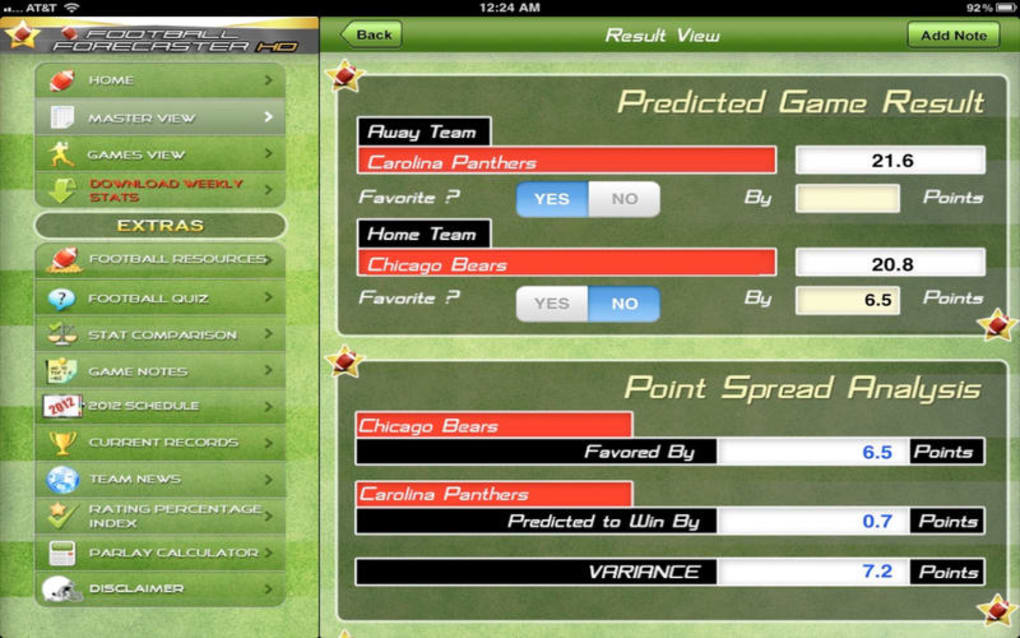
Upon launch, the home screen displays a calendar view of upcoming fixtures. Use the left‑hand navigation panel to select a league (e.g., Premier League, La Liga, Bundesliga). The main window then populates with a table of matches, each row showing the predicted probability percentages, suggested betting odds, and a “Details” button.
Clicking “Details” opens a pop‑up with deeper analytics: player form charts, head‑to‑head history, and weather forecasts. For bettors, the “Betting Tools” tab provides a stake calculator where you can input your bankroll and risk tolerance to receive suggested wager sizes. Fantasy‑football enthusiasts can switch to the “Fantasy” tab, which ranks players based on projected points and upcoming fixtures.
All visualizations are exportable as PNG or PDF for easy sharing.
Updates & Maintenance
Football Forecaster checks for updates automatically each time you start the app. When a new version is available, a discreet banner appears in the top‑right corner. Clicking “Update Now” downloads and installs the patch without losing your custom settings, thanks to the built‑in cloud sync feature. For users who prefer manual control, you can disable automatic checks in the Preferences menu under “General → Update Settings”. Regular updates ensure the predictive engine stays aligned with the latest statistical models and that new leagues are added promptly.
Pros, Cons, FAQ and Final Verdict
Pros
- Highly accurate predictive engine based on machine‑learning models.
- Native macOS design offers fast performance and smooth UI.
- Comprehensive data integration, including live odds and injury reports.
- Useful betting and fantasy‑football tools in one package.
- Secure cloud backup keeps preferences synchronized across devices.
Cons
- Only available for macOS; no Windows or Linux version.
- Advanced features may have a learning curve for complete beginners.
- Requires an internet connection for live data updates.
- Initial download is free, but full access to premium leagues requires a one‑time purchase.
Frequently Asked Questions
Is Football Forecaster a free app?
The base version can be downloaded for free, but premium features such as advanced league coverage and cloud sync require a one‑time purchase.
Can I use Football Forecaster on a Windows PC?
Currently the software is native to macOS only. Windows users can run it via a macOS virtual machine, but an official Windows version is not planned at this time.
How often is the data updated?
Live data (odds, injuries, weather) is refreshed every 15 minutes during active match days. Historical data updates occur nightly.
Is my personal information safe?
Yes. Football Forecaster is signed with a valid Apple developer certificate, uses encrypted HTTPS connections for data retrieval, and stores any personal preferences only in the user’s iCloud keychain when cloud sync is enabled.
What kind of support is provided?
The developer offers email support, a detailed knowledge base, and regular webinars that walk users through new features and forecasting strategies.
Conclusion & Call to Action
Football Forecaster delivers a rare blend of statistical depth, user‑friendly design, and macOS‑specific optimization that makes it the go‑to app for anyone serious about football predictions. While the lack of a Windows version limits its audience, the app’s robust feature set, secure update mechanism, and regular data refreshes more than compensate for that gap. If you’re ready to transform raw match data into clear betting advantages or simply want a smarter way to build your fantasy squads, downloading Football Forecaster today is a smart move. Click the button below to start your free download and unlock the premium league insights with a single, affordable purchase.







